THE PLATFORM

Evidence you can act on.

Explore the workspace behind the observations. Follow the context, review what needs attention and decide what happens next.

SCROLL TO STEP INSIDE ↓
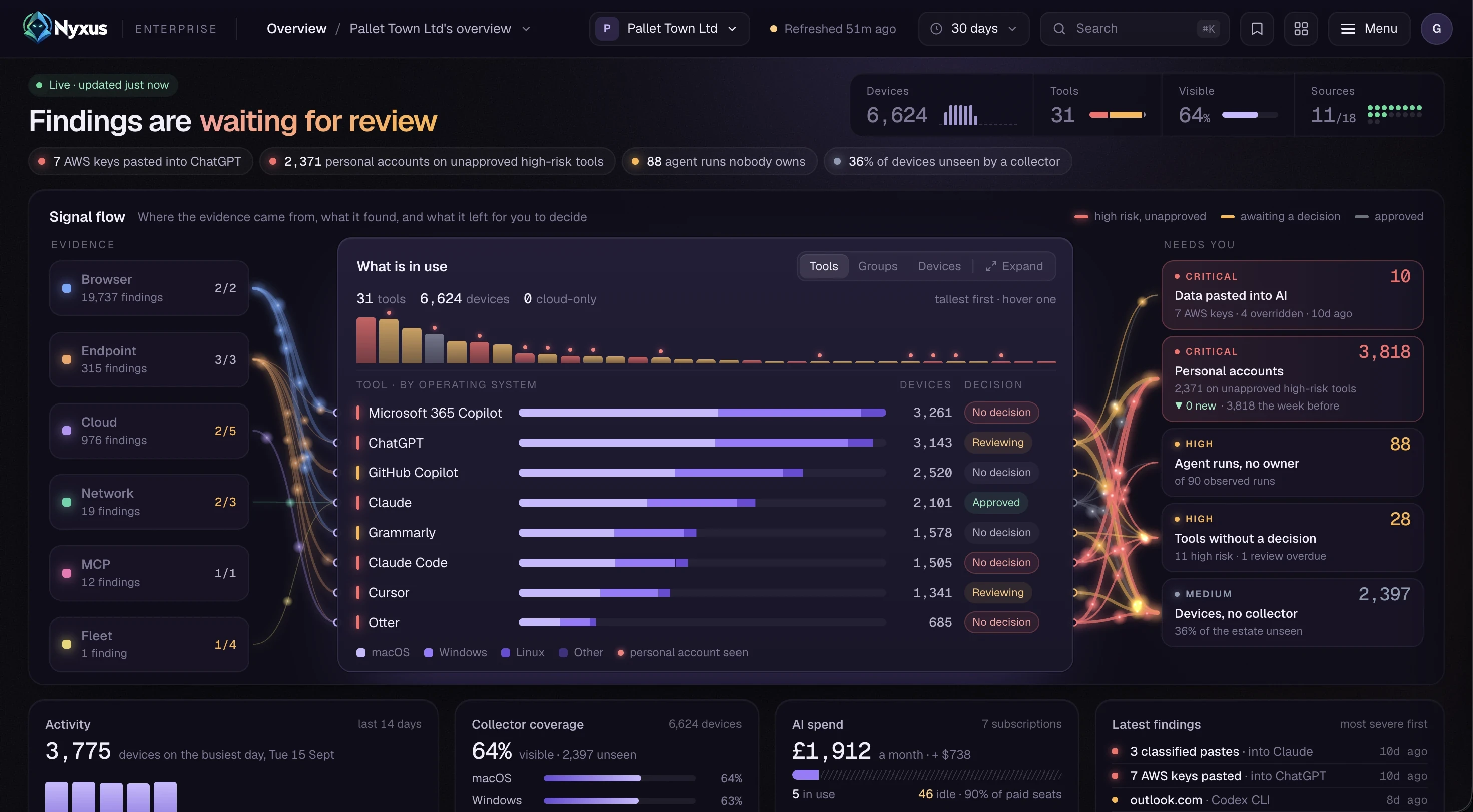
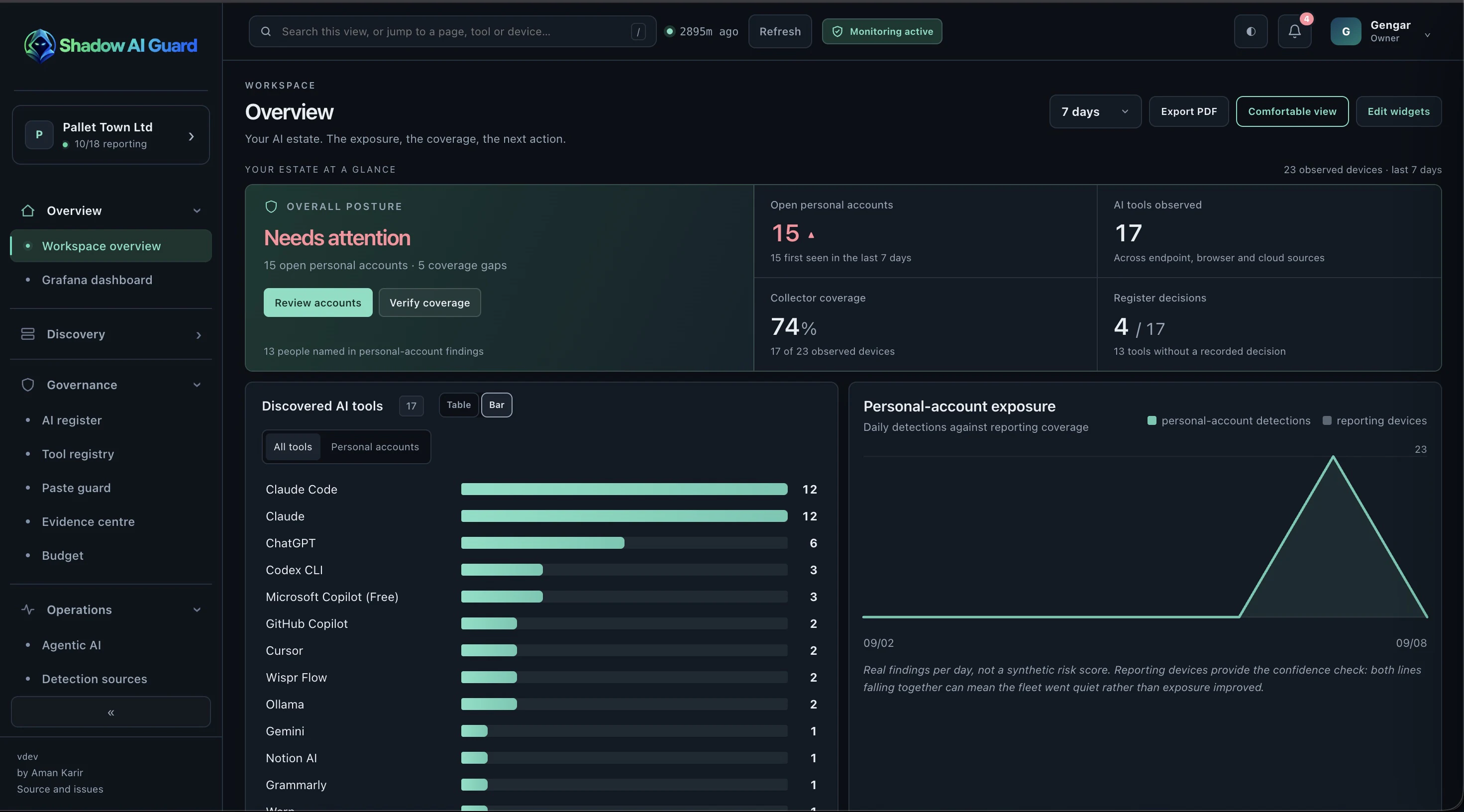
Actual product capture · sample data · no sign-in
Nyxus Enterprise overview: findings waiting for review and the signal flow from evidence to decisionsShadow AI Guard overview: overall posture, discovered AI tools and personal-account exposure
01 / 03 · EvidenceEvidence comes in from the browser, endpoints, cloud, network, MCP servers and the fleet.
02 / 03 · What is in useIt resolves into the tools in use, the devices they run on and the decision recorded for each.
03 / 03 · Needs youWhat is left is a short queue for a person to decide, most severe first.

Six workspaces. One menu.

Nyxus Enterprise groups its pages the way the work happens: find it, decide on it, keep coverage honest and keep the deployment healthy. These are the console’s own sections. Shadow AI Guard keeps the essentials in a single console.

Overview

The estate at a glance, across every company you run.

Workspace overview
All companies
Grafana dashboard
Discovery

What’s running, who’s running it, and on which account.

Tools2
People
Devices2
Personal accounts2
MCP servers
Activity
Changes
Unrecognised observations
Governance

What you decided, why, and the evidence behind it.

AI register3
Exceptions3
Rules
Tool registry
Paste guard
Evidence centre
Frameworks
Budget
Review queue3
Campaigns
Operations

Where your coverage reaches, and where it stops.

Agentic AI
Detection sources1
Coverage gaps1
Enrolled devices
Enrollment tokens
Deployment

Keeping the deployment itself safe.

Backups
Administration

How Nyxus is wired into your estate, and who can change it.

Administration
Detection & paste guard
Receiver & log store
Display & alerting
Integrations
Accounts & access
Teams
Companies
Getting started
Audit trail
System health
Identity map

Frameworks maps evidence to the EU AI Act, ISO/IEC 42001, NIST AI RMF, ISO/IEC 27001 and SOC 2. It’s a suggested mapping for your auditor to confirm, not an assessment. Numbered pages are the ones the console showed above: 1 Evidence, 2 What is in use, 3 Needs you.

Keep peoplein the loop.

Follow the evidence. Record an owner, a status and a review date. Make the next action clear.

01Discover · a signal is observed
02Understand · the context is checked
03Decide · a person records it
ChatGPT · charmanderILLUSTRATIVE RECORD
01 · OBSERVED SIGNALPersonal account observed
ChatGPT · outlook.com · WIN-CHARMBrowser evidence
02 · CONTEXT CHECK
Tool register● ApprovedObserved account● Needs a review
The tool is approved. A different account changes the context.
03 · HUMAN DECISION
OwnerIT operationsNext actionConfirm the account used for workStatusUnder reviewFollow-upReview in 7 days
The evidence, the decision and the follow-up stay together.

Start with Shadow AI Guard.Get to know Nyxus.

OPEN SOURCE · AVAILABLE TODAYShadow AI Guard

The free, open-source project is here today.

  • 01The same 31-tool catalogue, 18 sources and 7 surfaces
  • 02One console you run yourself
  • 03Apache-2.0, with public images on GHCR
Explore on GitHub ↗
PAID EDITION · COMING SOONNyxus Enterprise

The enterprise edition is on its way, and pricing and launch timing will follow.

  • 01Everything in Shadow AI Guard, across companies and teams
  • 02Rules, exceptions, a review queue and campaigns
  • 03Signed evidence packs and five framework mappings
Compare editions →
THE PLATFORM

Evidence you can act on.

Explore the workspace behind the observations. Follow the context, review what needs attention and decide what happens next.

Shadow AI Guard overview: overall posture and discovered AI toolsNyxus Enterprise overview: findings waiting for review and the signal flow behind them
01Evidence comes in from the browser, endpoints, cloud, network, MCP servers and the fleet.
02It resolves into the tools in use, the devices they run on and the decision recorded for each.
03What is left is a short queue for a person to decide, most severe first.
Open the interactive preview ↗Actual product capture · sample data · no sign-in

Six workspaces.One menu.

Nyxus Enterprise groups its pages the way the work happens: find it, decide on it, keep coverage honest and keep the deployment healthy. These are the console’s own sections. Shadow AI Guard keeps the essentials in a single console.

AI register3Exceptions3RulesTool registryPaste guardEvidence centreFrameworksBudgetReview queue3Campaigns

Keep peoplein the loop.

Follow the evidence. Record an owner, a status and a review date. Make the next action clear.

01Discover
02Understand
03Decide
ChatGPT · charmanderILLUSTRATIVE
01 · OBSERVED SIGNALPersonal account observedChatGPT · outlook.com · WIN-CHARM
02 · CONTEXT CHECK
Tool register● Approved
Observed account● Needs a review
03 · HUMAN DECISION
OwnerIT operationsNext actionConfirm the account used for workStatusUnder reviewFollow-upReview in 7 days

Start with Shadow AI Guard.
Get to know Nyxus.

OPEN SOURCE · AVAILABLE TODAYShadow AI Guard

The free, open-source project is here today.

  • 01The same 31-tool catalogue, 18 sources and 7 surfaces
  • 02One console you run yourself
  • 03Apache-2.0, with public images on GHCR
Explore on GitHub ↗
PAID EDITION · COMING SOONNyxus Enterprise

The enterprise edition is on its way, and pricing and launch timing will follow.

  • 01Everything in Shadow AI Guard, across companies and teams
  • 02Rules, exceptions, a review queue and campaigns
  • 03Signed evidence packs and five framework mappings
Compare editions →